Uni Invoice: Invoice Manager2.2.96
Publisher Description

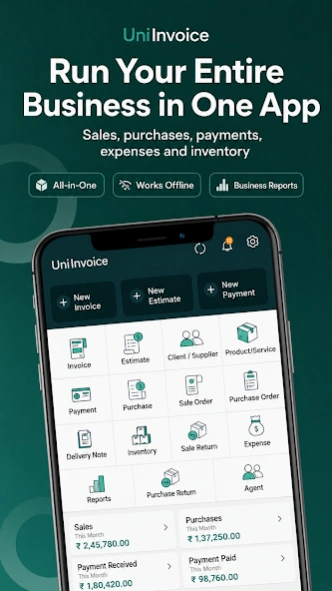
Create invoices, track payments, manage inventory and collaborate with your team
INVOICING AND BUSINESS MANAGEMENT—BUILT TO GROW WITH YOU
UniInvoice helps freelancers, retailers, wholesalers, distributors, manufacturers, service providers and growing businesses manage invoicing and everyday operations from one platform.
Create invoices, estimates, quotations, orders and receipts. Track payments, purchases, expenses, inventory, production and profitability. Start as a single user and add team members with roles and permissions as your business grows.
Work online or offline, use UniInvoice across mobile and desktop, and create invoices in multiple currencies and languages.
CREATE PROFESSIONAL INVOICES
• Create invoices, estimates, quotations, orders and receipts
• Add your business logo and customize invoice details
• Apply taxes and discounts by item or on the total
• Work with multiple currencies and languages
• Convert estimates and orders into invoices
• Generate professional PDF documents
• Share through WhatsApp, email and other apps
• Create invoices even when offline
SMARTER AND FASTER BILLING
Save time while creating repeat invoices.
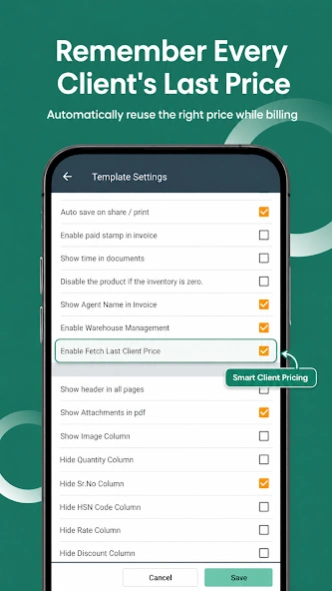
• Automatically fetch the last price charged to a customer
• Maintain customer-specific product pricing
• Quickly add frequently used products and clients
• Reduce repeated data entry
• Create accurate invoices faster
PAYMENTS AND CUSTOMER BALANCES
• Record full, partial and advance payments
• Track paid, partially paid and unpaid invoices
• Generate and share payment receipts
• View customer transaction history and ledgers
• Monitor outstanding and overdue payments
• Keep customer and supplier records organized
INVENTORY, BATCH AND EXPIRY MANAGEMENT
• Add and manage products and services
• Record purchases and update inventory
• Track stock quantities and movements
• Manage product pricing and units
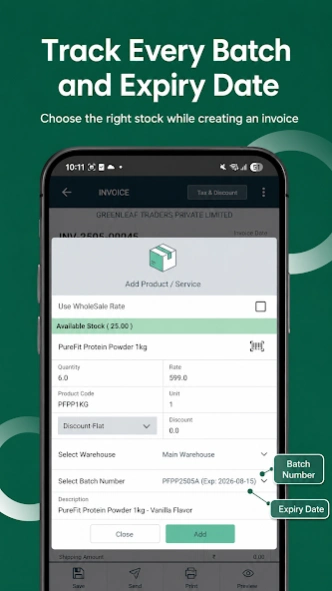
• Create and track batch numbers
• Record and monitor expiry dates
• Select the appropriate batch while invoicing
• Access inventory and product reports
PRODUCTION AND MANUFACTURING
Manage production activities together with inventory and business transactions.
• Record production transactions
• Record materials used in production
• Manage produced and finished products
• Connect production activities with inventory
• Monitor stock changes during production
• Maintain organized production records
SALES, PURCHASES AND EXPENSES
• Record sales and purchases
• Create sales and purchase orders
• Track expenses and payments
• Monitor order and payment status
• Maintain an organized transaction history
REPORTS AND BUSINESS PERFORMANCE
Understand your business using:
• Profit and Loss reports
• Sales and purchase reports
• Payment and outstanding reports
• Expense and tax reports
• Inventory and stock reports
• Customer and product reports
• Production-related information
Monitor profitability, outstanding payments, sales and inventory from one place.
MOBILE AND DESKTOP
Create invoices from your phone and access your business from desktop when you need a larger workspace.
Keep business information synchronized across supported devices without unnecessary duplicate entry.
BUILT FOR INDIVIDUALS AND TEAMS
• Start with a single-user plan
• Add multiple users to your organization
• Assign roles and permissions
• Control access to business functions
• Collaborate using centralized information
• Choose mobile, mobile and desktop, team or enterprise options
MADE FOR BUSINESSES WORLDWIDE
UniInvoice supports businesses working across different countries, currencies, languages and tax systems.
Suitable for:
• Freelancers and consultants
• Retailers and shop owners
• Wholesalers and distributors
• Manufacturers
• Service businesses
• Small and medium-sized businesses
• Multi-user organizations
START YOUR 14-DAY TRIAL
Download UniInvoice and simplify invoicing, payments, inventory, production and everyday business management.
About Uni Invoice: Invoice Manager
The company that develops Uni Invoice: Invoice Manager is Zero Digit. The latest version released by its developer is 2.2.96.
To install Uni Invoice: Invoice Manager on your Android device, just click the green Continue To App button above to start the installation process. The app is listed on our website since 2026-10-08 and was downloaded 18 times. We have already checked if the download link is safe, however for your own protection we recommend that you scan the downloaded app with your antivirus. Your antivirus may detect the Uni Invoice: Invoice Manager as malware as malware if the download link to com.zero.invoice is broken.
How to install Uni Invoice: Invoice Manager on your Android device:
- Click on the Continue To App button on our website. This will redirect you to Google Play.
- Once the Uni Invoice: Invoice Manager is shown in the Google Play listing of your Android device, you can start its download and installation. Tap on the Install button located below the search bar and to the right of the app icon.
- A pop-up window with the permissions required by Uni Invoice: Invoice Manager will be shown. Click on Accept to continue the process.
- Uni Invoice: Invoice Manager will be downloaded onto your device, displaying a progress. Once the download completes, the installation will start and you'll get a notification after the installation is finished.
